

Automating application deployments can make software delivery faster and more consistent. A developer pushes code, a CI/CD pipeline runs tests, builds a container image, pushes it to a registry, and deploys it to a Kubernetes cluster.
But there is an important security question behind this process: what permissions does that pipeline have, and how do we control them?
A deployment pipeline is not just a sequence of automated commands. It is an identity with access to infrastructure, container registries, and application workloads. If that identity is compromised or given excessive permissions, an attacker may be able to use it to access or modify resources far beyond the application it was intended to deploy.
This is why securing a CI/CD pipeline requires more than making the deployment work. We need to control who can assume the deployment identity, what that identity can do in AWS, and what it can change inside the Kubernetes cluster.
In this article, I will explore three important parts of that security model: AWS Identity and Access Management (IAM), OpenID Connect (OIDC), and Kubernetes Role-Based Access Control (RBAC). I will use a GitHub Actions pipeline I implemented for my Nova-App project on Amazon EKS to explain how these controls fit together, what they protect against, and where the configuration can be improved.
1. The Hidden Attack Surface of Automated Deployments
A CI/CD pipeline often needs access to several parts of a cloud environment. For an application deployed to Amazon EKS, it may need to:
- Authenticate with AWS.
- Push container images to Amazon Elastic Container Registry (ECR).
- Retrieve information about an EKS cluster.
- Authenticate to the Kubernetes API.
- Update a Kubernetes Deployment.
Each permission creates a potential path into the environment.
Consider a pipeline that has administrator access to an AWS account and cluster-admin permissions inside Kubernetes. If an attacker compromises the repository, a workflow, or a credential used by the pipeline, those broad permissions could give the attacker total control over the environment.
The issue is not automation itself: it is the amount of access granted to the automation.
A fundamental principle here is least privilege: every identity should receive only the permissions it needs to perform its assigned task, scoped to specific resources wherever possible. For a deployment pipeline, this means decoupling the permissions needed to interact with AWS APIs from the permissions needed to modify Kubernetes workloads.
2. Eliminating Long-Lived Credentials: The Case for Identity Federation
Before deciding what a pipeline can do, we need to decide which pipeline is allowed to act.
In my Nova-App project, I used GitHub Actions to automate deployments to an Amazon EKS cluster. The workflow runs when code is pushed to the main branch. It tests the application, builds a Docker image, pushes that image to ECR, and updates the Kubernetes Deployment.
For this to happen, GitHub Actions needs an identity that AWS can recognize.
One common approach is creating an IAM user, generating an access key, and storing it in GitHub Secrets. However, storing long-lived credentials introduces unnecessary operational risk. If an access key leaks through workflow mistakes, compromised runner environments, or improper access controls, an attacker gains persistent access until the key is manually revoked.
Instead of storing permanent keys in GitHub Secrets, a far more secure approach is leveraging workload identity federation via OpenID Connect (OIDC).
3. Configuring GitHub Actions OIDC and AWS IAM Trust Policies
OpenID Connect (OIDC) allows GitHub Actions to obtain short-lived, temporary credentials directly from AWS Security Token Service (STS) for each workflow run.
The Identity Exchange Sequence
GitHub Actions        GitHub OIDC provider        AWS STS                  Amazon EKS
      |                        |                     |                         |
      |-- 1. Request token --->|                     |                         |
      |<-- 2. Signed JWT ------|                     |                         |
      |                                              |                         |
      |-- 3. AssumeRoleWithWebIdentity (JWT) ------->|                         |
      |                                   4. STS verifies the token and checks |
      |                                      the role's trust policy (aud, sub)|
      |<-- 5. Temporary AWS credentials -------------|                         |
      |                                                                        |
      |-- 6. kubectl calls, authenticated with the temporary credentials ----->|
Registering the Identity Provider
For AWS to trust tokens issued by GitHub, the GitHub OIDC provider must be registered in your AWS account:
- Provider URL:
https://token.actions.githubusercontent.com - Audience:
sts.amazonaws.com
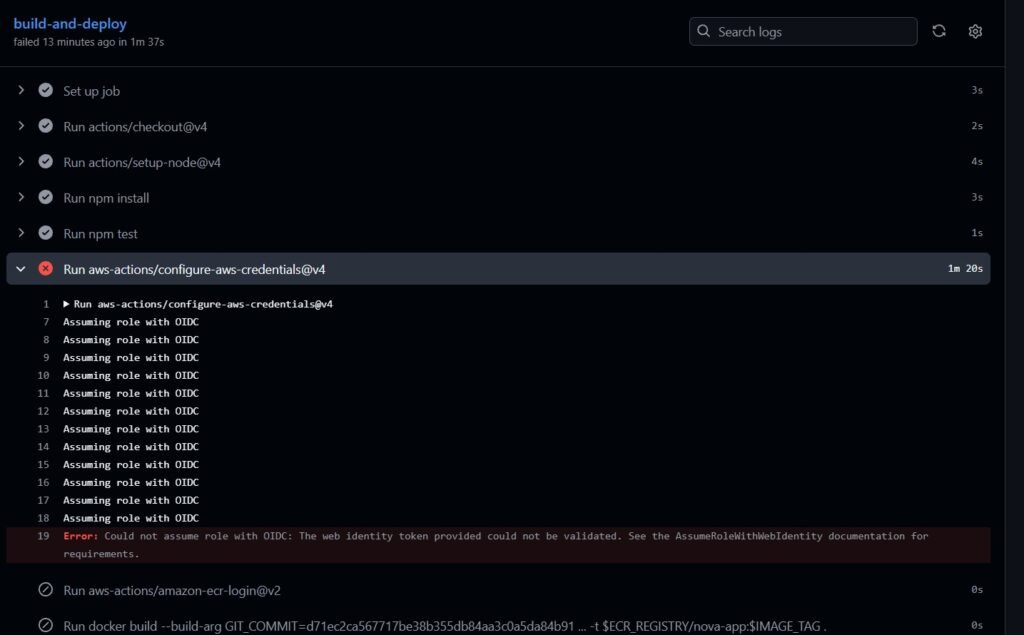
Key Retrospective Note: Be careful not to confuse GitHub Actions OIDC with the EKS cluster’s IAM Roles for Service Accounts (IRSA) OIDC provider. During early development, I ran an EKS OIDC association command meant for pod-level service accounts instead of IAM identity federation. My pipeline failed with “The web identity token provided could not be validated” because the IAM identity provider configuration was missing.
Crafting the IAM Trust Policy
Registering the provider does not mean every GitHub repository gets access. The IAM role’s trust policy defines which identity is allowed to assume the role. This is where the aud and sub claims become important.
audidentifies the intended audience of the token. In this configuration, it must matchsts.amazonaws.com.subidentifies the subject represented by the token. It can be used to restrict access to a particular GitHub repository, branch or other supported GitHub identity context.
The trust policy used in my Nova-App automated deployment included these conditions:
{
  "Version": "2012-10-17",
  "Statement": [
    {
      "Effect": "Allow",
      "Principal": {
        "Federated": "arn:aws:iam::123456789123:oidc-provider/token.actions.githubusercontent.com"
      },
      "Action": "sts:AssumeRoleWithWebIdentity",
      "Condition": {
        "StringEquals": {
          "token.actions.githubusercontent.com:aud": "sts.amazonaws.com"
        },
        "StringLike": {
          "token.actions.githubusercontent.com:sub": "repo:Globak143/nova-app:*"
        }
      }
    }
  ]
}
The first condition checks that the token is intended for AWS STS.
The second condition restricts the subject to the nova-app repository. This is an important security control because it prevents the role from being available to every repository that uses the GitHub OIDC provider.
However, there is a detail worth understanding. The wildcard * at the end of the subject means the policy is not restricted to the main branch alone. Although my workflow was configured to run on pushes to main, the trust policy itself allows matching subjects from other references in that repository.
For a stronger restriction, the trust policy should be designed to match the intended branch or deployment environment. For example, a workflow that should deploy only from main can use a subject condition that identifies that branch.
If your repository was created recently, check which
subformat it uses. GitHub has been adding numeric owner and repository IDs to the claim, and your trust policy must match the format your repository uses.
A workflow trigger determines when a workflow runs; a trust policy determines which workflow identity can obtain AWS credentials. Both should be considered when securing deployments.
4. Scoping AWS IAM Policies: Moving Beyond Resource: "*"
Once a workflow assumes an IAM role, permissions policies govern what API calls it can execute.
In the initial implementation of my automated deployment, I created an IAM role named github-actions-nova-app-deploy.
The permissions policy included the following actions:
{
  "Version": "2012-10-17",
  "Statement": [
    {
      "Effect": "Allow",
      "Action": [
        "ecr:GetAuthorizationToken",
        "ecr:BatchCheckLayerAvailability",
        "ecr:PutImage",
        "ecr:InitiateLayerUpload",
        "ecr:UploadLayerPart",
        "ecr:CompleteLayerUpload",
        "eks:DescribeCluster"
      ],
      "Resource": "*"
    }
  ]
}
With Resource: "*", the role could write images to every ECR repository in the account, not just nova-app, and describe every EKS cluster.
Refactoring to Resource-Scoped Least Privilege
While ecr:GetAuthorizationToken requires Resource: "*" due to AWS API design, all image write operations and EKS metadata calls can, and should, be locked down to specific resource ARNs:
{
  "Version": "2012-10-17",
  "Statement": [
    {
      "Sid": "ECRAuthToken",
      "Effect": "Allow",
      "Action": "ecr:GetAuthorizationToken",
      "Resource": "*"
    },
    {
      "Sid": "ScopedECRImagePush",
      "Effect": "Allow",
      "Action": [
        "ecr:BatchCheckLayerAvailability",
        "ecr:PutImage",
        "ecr:InitiateLayerUpload",
        "ecr:UploadLayerPart",
        "ecr:CompleteLayerUpload"
      ],
      "Resource": "arn:aws:ecr:us-east-1:123456789123:repository/nova-app"
    },
    {
      "Sid": "ScopedEKSDescribe",
      "Effect": "Allow",
      "Action": "eks:DescribeCluster",
      "Resource": "arn:aws:eks:us-east-1:123456789123:cluster/nova-app-cluster"
    }
  ]
}
This updated policy restricts ECR writes exclusively to the nova-app repository and limits cluster discovery solely to nova-app-cluster.
Giving an IAM role permission to call eks:DescribeCluster does not automatically grant permission to update a Deployment.
The role must also be recognized by the cluster, and it must receive the appropriate Kubernetes permissions.
5. Connecting AWS IAM Role to Kubernetes
Calling eks:DescribeCluster allows the AWS CLI (aws eks update-kubeconfig) to retrieve the cluster details and configure a local context for kubectl. It does not grant permission to create or update resources inside Kubernetes.
That is because AWS and Kubernetes keep separate permission systems. IAM proves who you are. Kubernetes decides what you can do.
- Authentication (AWS IAM): Confirms who is making the request. In our case, it is the IAM role assumed by GitHub Actions.
- Authorization (Kubernetes RBAC, or EKS access policies): Determines what that identity is allowed to do inside the cluster.
Mapping the IAM Role to Kubernetes
Our GitHub Actions workflow already has an AWS identity, but Kubernetes needs a way to recognize it. This is where identity mapping comes in. It connects the IAM role to a Kubernetes username and group. We can then use Kubernetes RBAC to define what members of that group are allowed to do.
There are two approaches: EKS access entries, which AWS recommends, and the older aws-auth ConfigMap approach.
In my automated deployment, I used eksctl to add the GitHub Actions IAM role to the cluster’s aws-auth ConfigMap:
# Add the IAM role to the cluster's aws-auth ConfigMap and put it in a Kubernetes group
eksctl create iamidentitymapping \
  --cluster nova-app-cluster \
  --region us-east-1 \
  --arn arn:aws:iam::123456789123:role/github-actions-nova-app-deploy \
  --username github-actions \
  --group nova-app-ci-deployer
This command registers the IAM role with the cluster and associates it with the nova-app-ci-deployer Kubernetes group. It works on clusters that still accept the ConfigMap, which is the default for eksctl clusters.
But this mapping alone does not give GitHub Actions permission to deploy. It only establishes the identity that Kubernetes RBAC can use when checking permissions. We still need a Kubernetes Role and RoleBinding to define what this group can do.
Note: AWS now recommends EKS access entries instead of the deprecated
aws-authConfigMap approach. If I were setting up this cluster again, I would use access entries to register the IAM role and associate it with the Kubernetes group:
# Register the IAM role with the cluster and put it in the Kubernetes group
aws eks create-access-entry \
  --cluster-name nova-app-cluster \
  --principal-arn arn:aws:iam::123456789123:role/github-actions-nova-app-deploy \
  --type STANDARD \
  --kubernetes-groups nova-app-ci-deployer
6. Defining Kubernetes Permissions with RBAC
Now that the IAM role is mapped to the nova-app-ci-deployer group, we need to define what that group can do inside the cluster.
Kubernetes RBAC (Role-Based Access Control) allows us to assign specific permissions to users and groups. Instead of granting GitHub Actions cluster-admin access, I restricted the pipeline to managing the Nova-App Deployment and monitoring its rollout.
Creating a Role and RoleBinding
I created a namespace-scoped Role and a corresponding RoleBinding in the default namespace:
apiVersion: rbac.authorization.k8s.io/v1
kind: Role
metadata:
  name: nova-app-deployer
  namespace: default
rules:
  - apiGroups: ["apps"]
    resources: ["deployments"]
    resourceNames: ["nova-app-deployment"]
    verbs: ["get", "list", "watch", "update", "patch"]
  - apiGroups: ["apps"]
    resources: ["replicasets"]
    verbs: ["get", "list", "watch"]
  - apiGroups: [""]
    resources: ["pods"]
    verbs: ["get", "list", "watch"]
---
apiVersion: rbac.authorization.k8s.io/v1
kind: RoleBinding
metadata:
  name: nova-app-deployer-binding
  namespace: default
subjects:
  - kind: Group
    name: nova-app-ci-deployer
    apiGroup: rbac.authorization.k8s.io
roleRef:
  kind: Role
  name: nova-app-deployer
  apiGroup: rbac.authorization.k8s.io
The manifest defines two resources:
- Role: Specifies the permissions available within the
defaultnamespace. It allows the pipeline to retrieve, monitor, and modify thenova-app-deployment. It also grants read access to ReplicaSets and Pods within the namespace. TheresourceNamesfield restricts access to the named Deployment rather than every Deployment in the namespace.
Note: When using the
listandwatchverbs withresourceNames, the request must include a field selector matchingmetadata.nameto the name of the Deployment. Without this matching selector, the request will not be authorized by this RBAC rule.
- RoleBinding: Connects the
nova-app-ci-deployergroup, established through the EKS identity mapping, to the permissions defined in thenova-app-deployerRole.
Together, these resources allow GitHub Actions to modify the designated application Deployment and monitor workload information within the namespace without receiving unrestricted administrative access to the cluster.
7. End-to-End Pipeline Architecture: Connecting the 5 Security Layers
We have looked at each security control separately. Now let’s see how they work together during a deployment.
The following excerpt from .github/workflows/deploy.yml shows where some of these controls appear in the workflow and where AWS and Kubernetes take over:
# Excerpt from .github/workflows/deploy.yml

on:
  push:
    branches: [main]  # Triggers deployment from main

permissions:
  id-token: write    # Layer 1: Allows the job to request an OIDC token
  contents: read

jobs:
  deploy:
    runs-on: ubuntu-latest
    steps:
      # ... checkout and other steps omitted ...

      - uses: aws-actions/configure-aws-credentials@v4
        with:
          # Layers 2 and 3: AWS validates the trust policy
          # and applies the role's permissions.
          role-to-assume: arn:aws:iam::123456789123:role/github-actions-nova-app-deploy
          aws-region: us-east-1

      # Configure kubectl to communicate with the EKS cluster
      - run: aws eks update-kubeconfig --name nova-app-cluster --region us-east-1

      # Layers 4 and 5: EKS identity mapping and Kubernetes RBAC
      # determine whether this deployment operation is allowed.
      - run: |
          kubectl set image deployment/nova-app-deployment \
            nova-app-container=$ECR_REGISTRY/$ECR_REPOSITORY:${{ github.sha }}
The workflow does not contain all five configurations. Some are defined in AWS IAM, while others are configured inside the EKS cluster. However, they work together to control what happens when a deployment runs.
Five Security Layers for Securing a GitHub Actions-to-EKS Deployment Pipeline
- GitHub OIDC: Allows GitHub Actions to request a short-lived identity token without storing permanent AWS access keys.
- IAM trust policy: Determines which GitHub repository and branch are allowed to assume the deployment role.
- IAM permissions policy: Controls which AWS actions the assumed role can perform, including the required ECR and EKS operations.
- EKS identity mapping: Turns the AWS identity into a recognized Kubernetes identity, through access entries or the
aws-authConfigMap. - Kubernetes RBAC: Restricts what that identity can do inside the cluster, including updating the designated Deployment in the
defaultnamespace.
Each layer has a different responsibility. Together, they provide defense in depth, ensuring that access is not determined by a single permission or configuration.
8. Common CI/CD Misconfigurations and How to Fix Them
❌ Misconfiguration 1: Static AWS Access Keys
- The Risk: Storing permanent credentials in GitHub Secrets creates permanent exposure vectors if workflow execution logs or runner environments are compromised.
- The Fix: Transition to GitHub OIDC identity federation using dynamic, short-lived STS tokens.
❌ Misconfiguration 2: Broad sub Claims in IAM Trust Policies
- The Risk: Using
repo:org/repo:*allows any workflow, branch, pull request, or tag execution in the repository to assume your deployment role. - The Fix: Lock the
subcondition to your target branch:repo:org/repo:ref:refs/heads/main.
❌ Misconfiguration 3: Resource: "*" on Write Operations
- The Risk: Allowing
ecr:PutImageonResource: "*"means a compromised workflow could overwrite container images across any repository in your AWS account. - The Fix: Scope ECR upload actions specifically to your target repository ARN (
arn:aws:ecr:...:repository/nova-app).
❌ Misconfiguration 4: Binding Pipelines to system:masters
- The Risk: Mapping your IAM role to built-in admin groups grants complete administrative control over the cluster.
- The Fix: Use custom namespace-scoped Role and RoleBinding objects restricted to target workloads.
❌ Misconfiguration 5: Assuming a Passing Build Equals a Secure Pipeline
- The Risk: Over-permissioned workflows pass cleanly because they have too much access, disguising security risks as successful builds.
- The Fix: Perform negative RBAC testing to verify that the deployment identity fails when attempting unauthorized actions.
Conclusion
Building the Nova-App pipeline highlighted an essential engineering reality: a working pipeline is not automatically a secure one. As a solo developer, pushing directly to main kept development moving quickly. However, a closer audit revealed that my OIDC trust policy accepted claims from any branch, while the repository had no mandatory review requirements before deployment.
In a production environment, securing this workflow requires hardening both the repository and identity boundaries. That means enforcing branch protection rules, requiring pull request reviews and passing status checks before code can be merged, and restricting the IAM trust policy to refs/heads/main or an appropriately configured GitHub Environment.
Pipeline security isn’t achieved by a single tool. It requires an architectural commitment across every layer of the deployment lifecycle. By enforcing least privilege from the GitHub Actions runner, through AWS IAM, down to the Kubernetes API, we can ensure automation accelerates software delivery without compromising infrastructure security.
References
- AWS Identity and Access Management (IAM). AWS IAM Documentation.
- GitHub Docs. Configuring OpenID Connect in Amazon Web Services.
- Amazon Web Services. Grant IAM Users Access to Kubernetes with EKS Access Entries.
- eksctl Documentation. EKS Access Entries.
- Kubernetes Documentation. Using RBAC Authorization.
Author: Gloria Boakye | AWS Community Builder