

In the previous parts of this series, we explored how Wi-Fi evolved and how devices communicate through radio waves. We looked at frequencies, channels, interference, and how multiple devices share the same wireless medium.
But there’s one important question we haven’t addressed.
If Wi-Fi signals travel through the air, what prevents someone nearby from intercepting our communications?
Unlike a wired connection, where physical access to the cable or network infrastructure is generally required, wireless signals can be received by anyone with suitable equipment within range.
That doesn’t necessarily mean they can read the information being transmitted. This is where encryption and authentication come into play.
Encryption protects the contents of our communication, while authentication helps establish whether a device is authorized to connect to a network.
Over the years, Wi-Fi security has evolved considerably. Some improvements introduced stronger encryption, while others addressed weaknesses in authentication and key management.
Let’s look at how we got here.
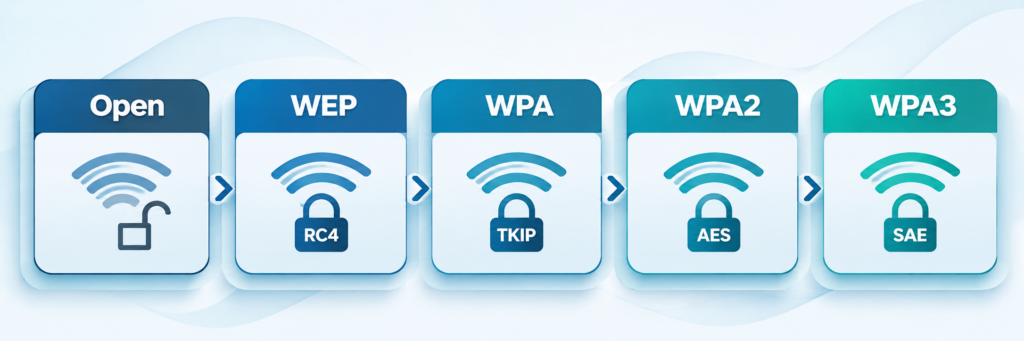
Open Networks: When There Was No Wireless Encryption
We’ve all probably connected to an open Wi-Fi network before, whether at a café, airport, or public facility.
Traditional open networks allow devices to connect without a Wi-Fi password and do not provide link-layer encryption for wireless data frames.
This means someone within radio range could potentially capture the transmitted frames and inspect any information that isn’t otherwise encrypted.
However, an open Wi-Fi network doesn’t automatically mean all your internet traffic is readable. Technologies such as HTTPS use TLS to encrypt communication between your browser and a website, independently of Wi-Fi encryption.
Modern networks may also support Enhanced Open, which uses Opportunistic Wireless Encryption (OWE) to encrypt wireless traffic without requiring a shared password.
Nevertheless, traditional open Wi-Fi highlighted the need for security directly at the wireless layer.
And that brings us to WEP.
WEP: The First Attempt at Wireless Privacy
When the original IEEE 802.11 standard was released in 1997, it included Wired Equivalent Privacy (WEP).
The goal was straightforward: provide wireless networks with privacy comparable to wired networks.
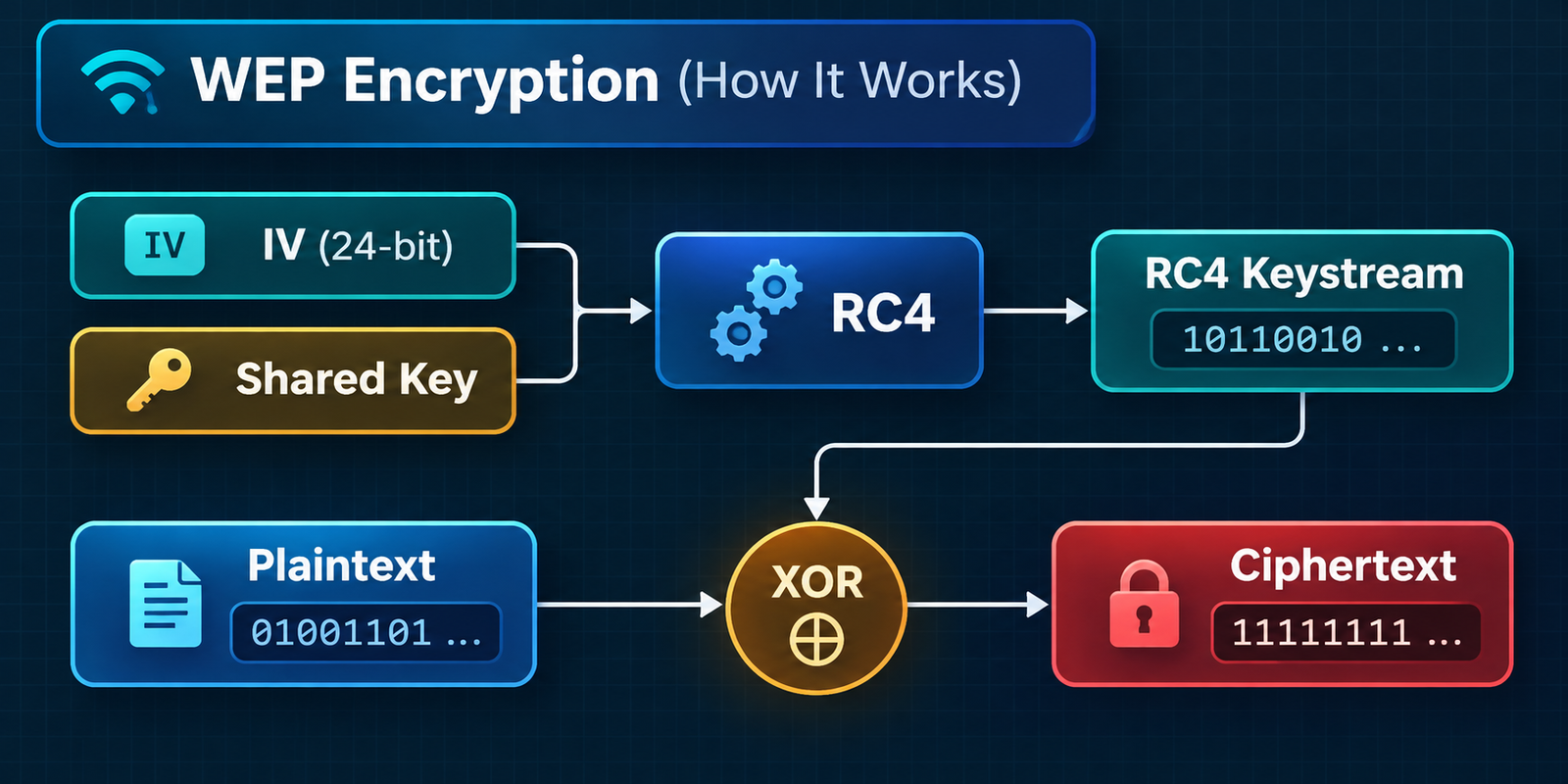
WEP used a stream cipher called RC4 to encrypt data. RC4 generates a sequence of bytes called a keystream, which is combined with the plaintext using an XOR operation.
Mathematically:
Ciphertext = Plaintext ⊕ Keystream
To generate that keystream, WEP combined a shared secret key with a 24-bit Initialization Vector (IV).
The IV was transmitted openly in each encrypted frame so that the receiving device could reproduce the correct keystream.
Unfortunately, this design introduced serious weaknesses.
A 24-bit IV provides only:
2²⁴ = 16,777,216 possible values
When an IV is reused with the same secret key, RC4 generates the same keystream again.
Consider two messages encrypted with an identical keystream:
C₁ = P₁ ⊕ K
C₂ = P₂ ⊕ K
XORing the ciphertexts gives:
C₁ ⊕ C₂ = P₁ ⊕ P₂
Notice that the keystream disappears. This exposes a relationship between the original messages, potentially allowing an attacker to recover information when parts of the plaintext are known.
But IV reuse wasn’t WEP’s only weakness.
Researchers discovered statistical weaknesses in RC4’s key scheduling algorithm. By collecting enough suitable encrypted frames, attackers could analyze relationships between the public IVs and encrypted data to recover the shared WEP key.
The Fluhrer–Mantin–Shamir (FMS) attack, published in 2001, demonstrated this weakness. Later techniques, including PTW, made practical key recovery more efficient.
WEP also used CRC-32 for integrity checking. While CRC-32 detects accidental transmission errors, it does not provide cryptographic protection against deliberate modification.
WEP’s failure demonstrated that encryption alone is insufficient when the surrounding protocol handles keys and integrity poorly.
A replacement was inevitable.
WPA: A Temporary but Necessary Improvement
In 2003, the Wi-Fi Alliance introduced Wi-Fi Protected Access (WPA) as an interim replacement for WEP.
WPA introduced the Temporal Key Integrity Protocol (TKIP), which improved key management while retaining RC4 for compatibility with older wireless hardware.
TKIP introduced per-packet key mixing, a larger 48-bit sequence counter, replay protection, and a message integrity mechanism.
These changes addressed several weaknesses found in WEP.
However, TKIP was constrained by the need to support existing hardware, and researchers eventually identified vulnerabilities affecting TKIP-based networks.
WPA was an improvement, but it wasn’t intended to be the final solution.
WPA2: Stronger Encryption and Better Key Management
In 2004, WPA2 arrived, based on the security improvements introduced through IEEE 802.11i.
Its major improvement was CCMP, a security protocol built around the Advanced Encryption Standard (AES).
You may have heard the term WPA2-AES. Although commonly used, there’s an important technical distinction:
AES is the encryption algorithm, while CCMP is the protocol that uses AES to provide confidentiality and integrity protection for wireless frames.
This offered substantially stronger protection than WEP and TKIP.
But before encrypted communication can begin, the access point and client must establish the necessary cryptographic keys.
That’s where the Four-Way Handshake comes in.
Understanding the WPA2 Four-Way Handshake
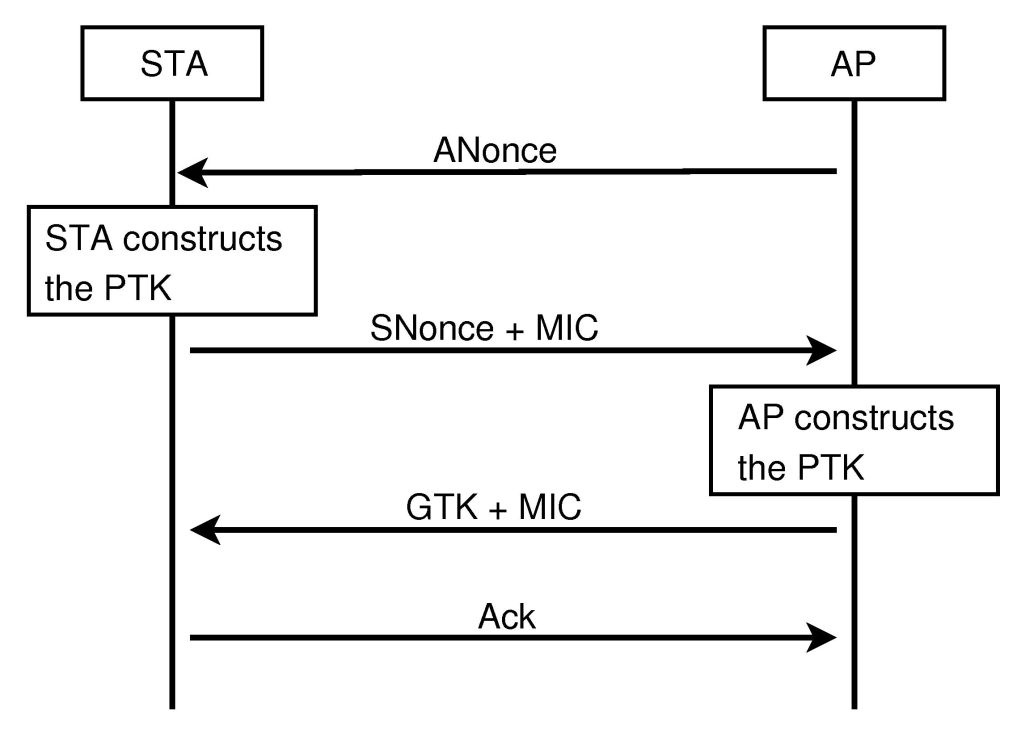
The Four-Way Handshake allows the client and access point to confirm possession of the required key material and establish session keys for encrypted communication.
The Wi-Fi password itself is not transmitted during this exchange.
Instead, the devices exchange cryptographic values and use existing key material to derive the encryption keys.
The process involves four messages:
- Message 1 — AP → Client: The access point sends a random value called the ANonce.
- Message 2 — Client → AP: The client generates an SNonce, derives the Pairwise Transient Key (PTK), and sends its nonce with a Message Integrity Code (MIC).
- Message 3 — AP → Client: The access point verifies the client’s response and sends protected key information, including group-key material where applicable.
- Message 4 — Client → AP: The client acknowledges the exchange, completing the handshake.
After the necessary keys have been installed, encrypted communication can begin.
An interesting security implication exists in WPA2-Personal.
If an attacker captures suitable authentication material, they can attempt to guess the network’s passphrase offline by deriving cryptographic values from candidate passwords and comparing them with the captured evidence.
This is not an attack against AES itself.
It targets the strength of the password used to establish the authentication key material.
A network can therefore use strong AES-CCMP encryption and still be vulnerable if its passphrase is weak.
Personal vs Enterprise: How Devices Authenticate
WPA and WPA2 support two common authentication models: Personal and Enterprise.
Personal Mode
WPA2-Personal, commonly called WPA2-PSK, uses a shared Wi-Fi passphrase.
It’s the familiar setup used in most homes and small offices.
The advantage is simplicity. Devices connect using the configured password without requiring a separate authentication server.
However, when several people share the same password, managing individual access becomes difficult.
Enterprise Mode
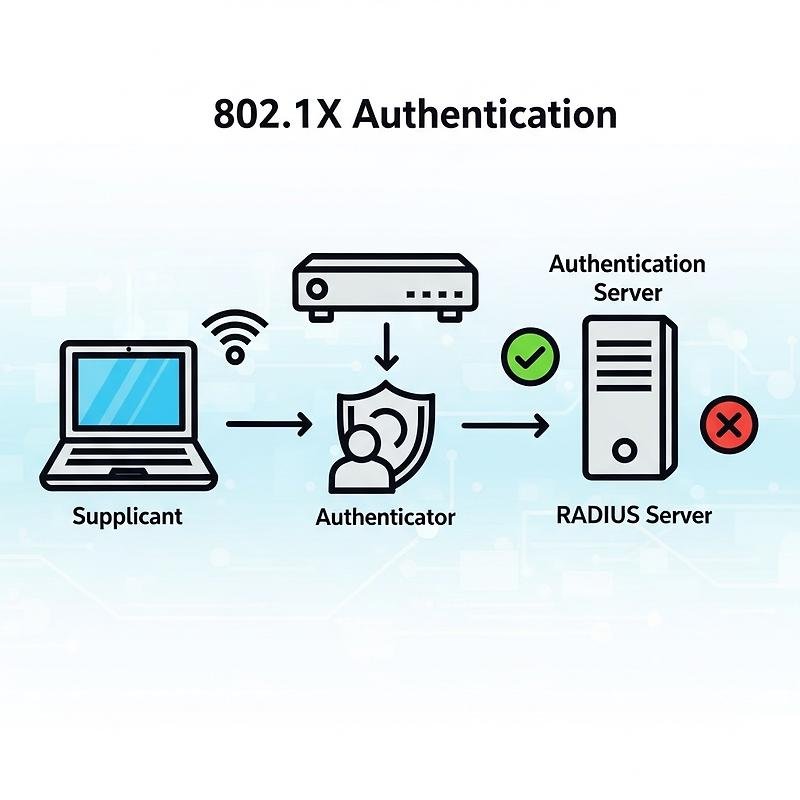
Enterprise networks commonly use IEEE 802.1X and the Extensible Authentication Protocol (EAP) to authenticate individual users or devices.
The architecture generally involves three components:
- Supplicant: The device requesting network access.
- Authenticator: Usually the wireless access point.
- Authentication server: Commonly a RADIUS server responsible for validating credentials.
Depending on the EAP method, authentication may involve usernames and passwords, digital certificates, or other credentials.
This gives organizations more control over individual access and credential management.
However, the security of Enterprise authentication also depends on correct configuration, particularly proper validation of authentication-server certificates.
WPS: When Convenience Introduces Another Weakness
You may have noticed a button labelled WPS (Wi-Fi Protected Setup) on some wireless routers.
Introduced in 2007, WPS was designed to simplify connecting devices to secured wireless networks without manually entering a long Wi-Fi password.
Two common methods are push-button connection and PIN-based enrolment.
The major security concern lies with the PIN method.
Although WPS uses an eight-digit PIN, weaknesses in its validation process reduce the effective search space to approximately 11,000 combinations.
On vulnerable routers without effective rate limiting or lockout mechanisms, attackers can exploit this through online PIN guessing.
Tools such as Reaver and Bully automate this process. Some implementations are also vulnerable to Pixie Dust attacks, which exploit weaknesses in cryptographic value generation to recover PINs offline.
Successful exploitation may allow an attacker to retrieve WPA/WPA2 credentials or gain access to the network without knowing the original Wi-Fi password.
Not every WPS-enabled router is vulnerable, and push-button enrolment does not share the same PIN brute-force weakness.
Still, a network can use strong WPA2 encryption while exposing a weakness through WPS.
This is why disabling PIN-based WPS, especially when it isn’t needed, is generally recommended.
WPA3: Strengthening Wireless Authentication
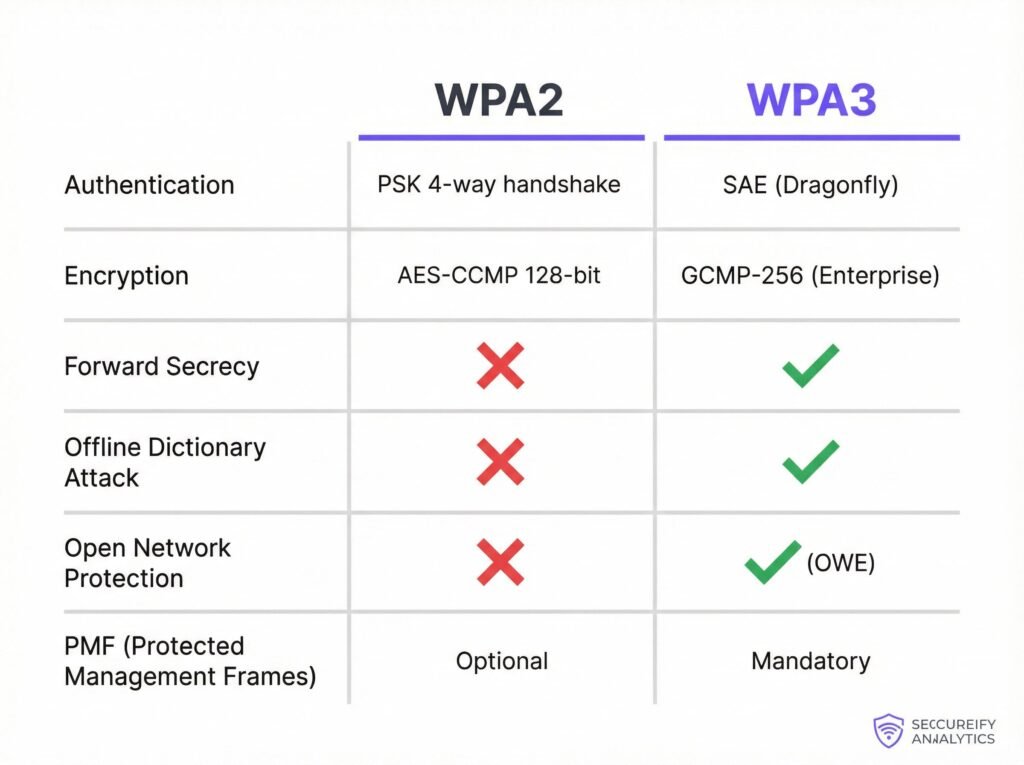
In 2018, the Wi-Fi Alliance introduced WPA3, bringing important improvements to wireless authentication and security.
One of the biggest changes in WPA3-Personal was Simultaneous Authentication of Equals (SAE).
SAE is a password-authenticated key exchange mechanism designed to resist passive offline dictionary attacks.
Unlike traditional WPA2-Personal authentication, SAE prevents an attacker from simply capturing one exchange and using it to test unlimited password guesses offline.
This doesn’t make weak passwords safe, but it significantly changes the attacker’s options.
An important detail is that WPA3 still uses the Four-Way Handshake.
SAE establishes the initial authenticated key material, after which the Four-Way Handshake derives and installs the keys used for encrypted communication.
WPA3 also requires Protected Management Frames (PMF), which help prevent forgery and replay of certain wireless management frames.
This reduces exposure to attacks involving spoofed deauthentication and disassociation frames.
However, PMF does not eliminate every form of wireless disruption.
WPA3 represents another important step forward, but like its predecessors, its security still depends on proper implementation and configuration.
When Strong Cryptography Isn’t Enough: KRACK
Even well-designed security protocols can become vulnerable when their implementations contain mistakes.
A good example is KRACK (Key Reinstallation Attacks), publicly disclosed in 2017 by researchers Mathy Vanhoef and Frank Piessens.
KRACK exploited weaknesses in how certain WPA2 implementations handled key installation during the Four-Way Handshake.
Under vulnerable conditions, retransmission of the third handshake message could cause a device to reinstall an encryption key that was already in use.
This could reset associated nonce or replay-counter state, potentially leading to keystream reuse and other security consequences.
The important distinction is that KRACK did not break AES encryption.
It exploited incorrect handling of cryptographic keys within the protocol implementation.
This illustrates why even networks using strong encryption still require software and firmware updates.
Where Wi-Fi Security Still Breaks
Looking at the evolution from Open networks through WEP, WPA, WPA2, and WPA3, it’s clear that wireless security has improved substantially.
But modern encryption alone doesn’t eliminate every security risk.
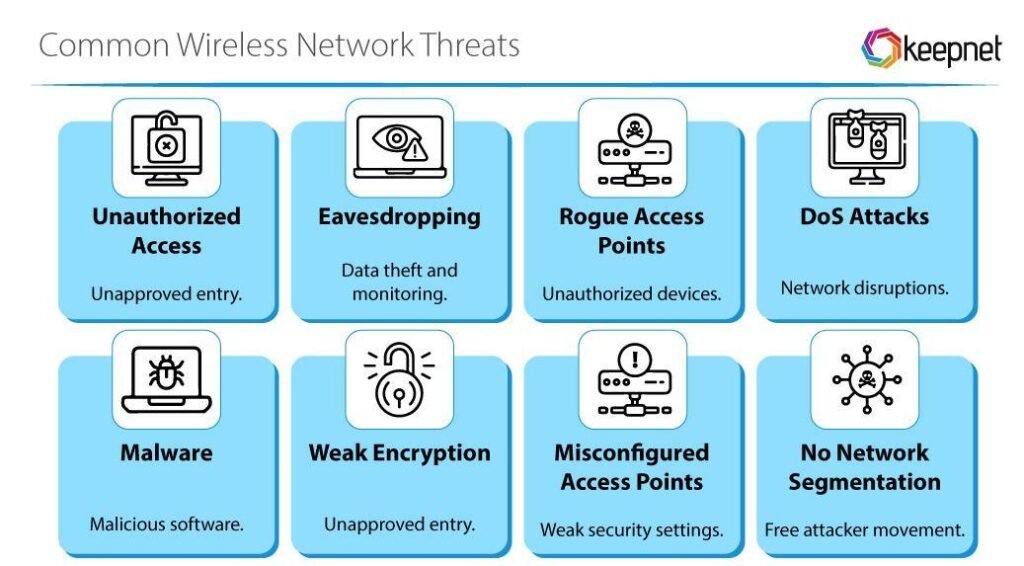
Weak passwords, outdated configurations, vulnerable router firmware, poorly configured Enterprise authentication, and rogue access points can still create opportunities for attackers.
There is also the issue of wireless availability. Encryption protects confidentiality and integrity, but it cannot prevent every attempt to interfere with radio communications.
Ultimately, wireless security depends on several mechanisms working together: authentication, encryption, key management, secure configuration, and correct implementation.
Final Thoughts
From traditional open networks to WPA3, the evolution of Wi-Fi security tells an interesting story.
WEP attempted to protect wireless communication but failed because of weaknesses in its cryptographic design. WPA introduced temporary improvements, while WPA2 established a much stronger security architecture using AES-CCMP.
WPA3 further strengthened authentication through SAE and introduced additional protections.
Yet the lesson remains the same:
Strong encryption does not automatically guarantee a secure wireless network.
A secure cipher can coexist with a weak password. A modern router can expose vulnerable enrolment mechanisms. And a correctly designed protocol can still be undermined by implementation mistakes.
Understanding these differences helps us look beyond whether a Wi-Fi network simply has a password.
We begin asking better questions: What authentication mechanism does it use? Which encryption protocol protects its traffic? How are keys established? And what weaknesses might still exist?
So far, we’ve explored how Wi-Fi developed, how it operates, and how its security mechanisms have evolved.
In the next part, we’ll move from theory to observation, examining how wireless networks advertise their capabilities, how authentication appears in captured traffic, and how these security mechanisms can be assessed in a controlled environment.
Because understanding how Wi-Fi security is designed is one thing. Seeing how it behaves on a real network is another.